Synced lyrics are lyrics with a time attached to every line, so the right words are on screen at the moment they are sung. Getting them for your own song is two separate jobs. Spotify and Apple Music keep lyrics in their own systems and you type them in there. Everything else reads a small file called an .lrc, and you make that yourself.
What an .lrc file is
It is a plain text file. You could open it in Notepad. Every line starts with a time in square brackets, then the words.
[00:12.40] I keep the lights on
A three minute song is fifty or so lines like that, and that is the whole format. Any player that supports it reads the times and puts the right line up as the track plays.
Here is the part that catches people out. The big streaming services will not accept that file. They hold lyrics in their own system, in their own format. So the answer to this question splits in two, depending on where you want the words to appear.
How to get your lyrics on Spotify
Spotify does not handle lyrics itself. Musixmatch does, and has for years. So you go to Musixmatch, not to Spotify for Artists. In Japan it is PetitLyrics instead.
- Make a Musixmatch Pro account. The free plan does everything in this list.
- Claim your artist profile. You paste in the link to your Spotify artist page and fill in a short form. Someone at Musixmatch checks it, which takes a few working days.
- Connect your Spotify account. The syncing step plays your song while you work, so you need Premium, and you need to be on a computer in Chrome. It does not work on a phone or in Safari.
- Paste the words in. Read the formatting rules further down first, because that is where lyrics get rejected.
- Press Sync. It shows one line at a time and plays the track. Tap as each line starts. One pass through the song and it is timed.
- Send it. It gets reviewed, and it usually shows up on Spotify within a day.
How to get your lyrics on Apple Music
Easier, because Apple only wants the words. Open Apple Music for Artists, go to Artist Content and pick the song. Any song without lyrics has a plus button on it. Click Add Lyrics and paste them in.
You do not time anything. Apple does the timing at their end, and whether a song gets the scrolling version is their call rather than yours.
Your distributor probably has a lyrics box as well. DistroKid and TuneCore both do. That route takes a week or two to appear instead of a couple of days, so go direct where you can.
The formatting rules that get lyrics rejected
Musixmatch and Apple want the words that are sung and nothing else. The rules are close to identical on both.
- No [Verse], [Chorus] or [Bridge] labels. Those are notes to yourself.
- No x2 and no repeat. If a line is sung four times, write it four times.
- A capital letter at the start of every line.
- No full stop at the end of a line.
- No producer tags, no names of who is singing, no (ad lib) in brackets.
- One blank line between sections. That is how they see where a verse ends.
So the copy sitting in your notes app is almost certainly not the version to paste in. The tags you write to keep yourself organised are exactly the thing they strip out.
What an .lrc file is actually for
If the streaming services will not take one, why make one? Because everything outside them will.
- Music players. Poweramp, MusicBee, foobar2000 and AIMP read .lrc files and scroll the words as the song plays.
- Your own library. Plex and Jellyfin show synced lyrics if the .lrc sits in the same folder as the song and carries the same name. Song.mp3 and Song.lrc.
- Open lyric databases. LRCLIB is a free one that a lot of smaller players pull from.
- Videos. A free web converter turns an .lrc into an .srt in one step, and .srt is the subtitle file CapCut, Premiere, DaVinci Resolve and YouTube all import.
That last one is why most people making music end up wanting the file. It is the difference between dragging fifty captions into place by hand and importing them already timed. If a lyric video is what you are after, there is also a way to do the whole thing without a video editor.

Doing the timing once instead of three times
Look at what those sections have in common. Musixmatch wants you to tap through the song. A video editor wants that same timing again. Your own player wants it a third time, as a file. It is one piece of information, entered by hand in three places.
Your song already knows it. Working out when each line lands is what you were doing when you recorded the vocal.
This is the part I make, so read the next few paragraphs with that in mind.
Lyriquee is a plugin. You drop it onto a track in FL Studio, Ableton, Logic or whatever you use, the same way you would drop on a reverb. It does not touch the sound. It gives you a page to write the lyrics on and keeps them inside the project file, so the words live with the song instead of in a separate note.
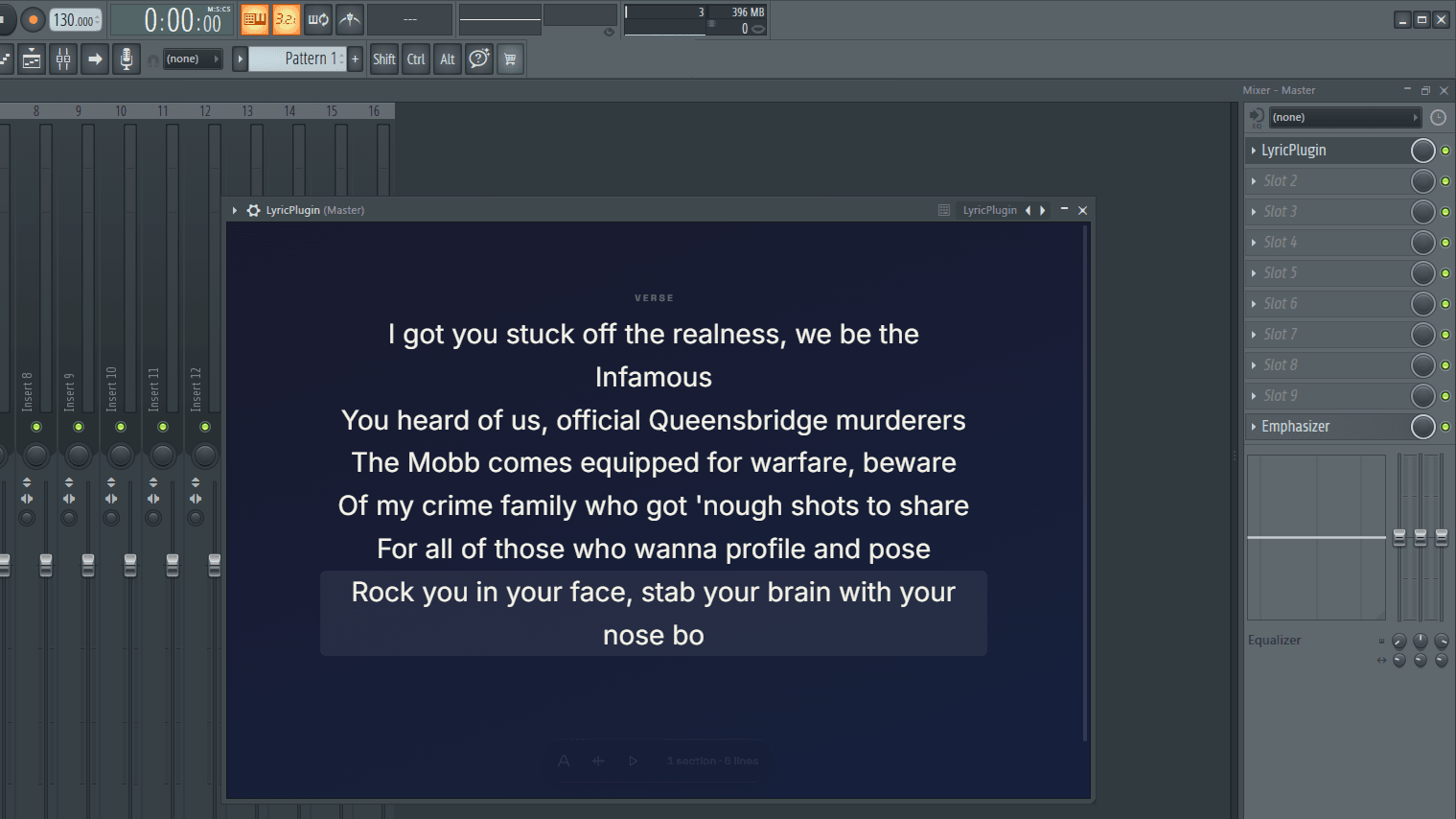
Play the song and click once at the start of each line. One pass and every line has a time on it, taken from the song rather than from a stopwatch. The times are stored against the beat instead of the clock, so changing the tempo afterwards does not push everything out of place.

Then export, and pick the file for wherever it is going.
- .txt is the plain lyrics with your section headings taken out, which is the version Musixmatch and Apple want. Paste and go.
- .lrc is the synced file, for players, for Plex, for anything that reads one.
- .srt is the same timing as subtitles, ready to drop into CapCut, Premiere or YouTube.
The clicking happens once. After that it is a matter of choosing which file you need.
Which file do you need
- Spotify. No file. The words and the timing both go in on Musixmatch. Export the .txt so at least you are pasting a clean copy.
- Apple Music. The plain .txt. Apple does the timing.
- A music player, Plex or Jellyfin. The .lrc, named the same as the song file.
- A lyric video or captions. The .srt.
Common questions
Can I upload an .lrc file to Spotify?
No. Spotify takes lyrics only through Musixmatch, where the words are pasted in and the timing is tapped in by hand. The file is still worth having for everywhere else.
Do I need Spotify Premium?
For the syncing step, yes, because it plays your track while you tap along. You also have to be on a computer, in Chrome.
How long until the lyrics show up?
Through Musixmatch, usually about a day after the review passes. Through a distributor, one to two weeks. Getting your artist profile verified in the first place is the slow part, so start that early.
What if I change a line later?
Edit it in the same place you added it and send it again. Only the lines you moved need timing again. Your own .lrc you simply export again.
What is word by word syncing?
A version of the format with a time on every word rather than every line, so single words light up. It is a much longer job and most players ignore it. Line timing is what nearly everything reads.
Is Musixmatch free?
For this, yes. The free plan covers adding, editing and syncing the lyrics on your own songs.
Start with a song that is already out
Pick one that is already on Spotify and get verified on Musixmatch while you wait, because the check is the slow part. Then do the timing pass once, and use the same work for the streaming lyrics, the file your player reads and the next video you post.